Automatic kilometre tracking removes the step that causes most Australians to lose records: remembering to start the app before you drive. Instead, your iPhone detects motion, logs the trip in the background, and presents it to you when you arrive. You classify it, add a purpose, and move on.
This guide explains how the technology works, whether the ATO accepts automatically generated records, and what you need to do to make your logs defensible.
How automatic kilometre tracking works
Your iPhone contains a motion coprocessor — a dedicated chip that tracks movement and activity without draining the battery. Automatic tracking apps use this chip together with GPS to identify when you start driving versus walking or cycling.
When motion that matches driving is detected, the app begins recording your route using GPS coordinates. It notes your start location, tracks your path, and calculates the distance once the trip ends. The start and end addresses are looked up from the GPS coordinates automatically.
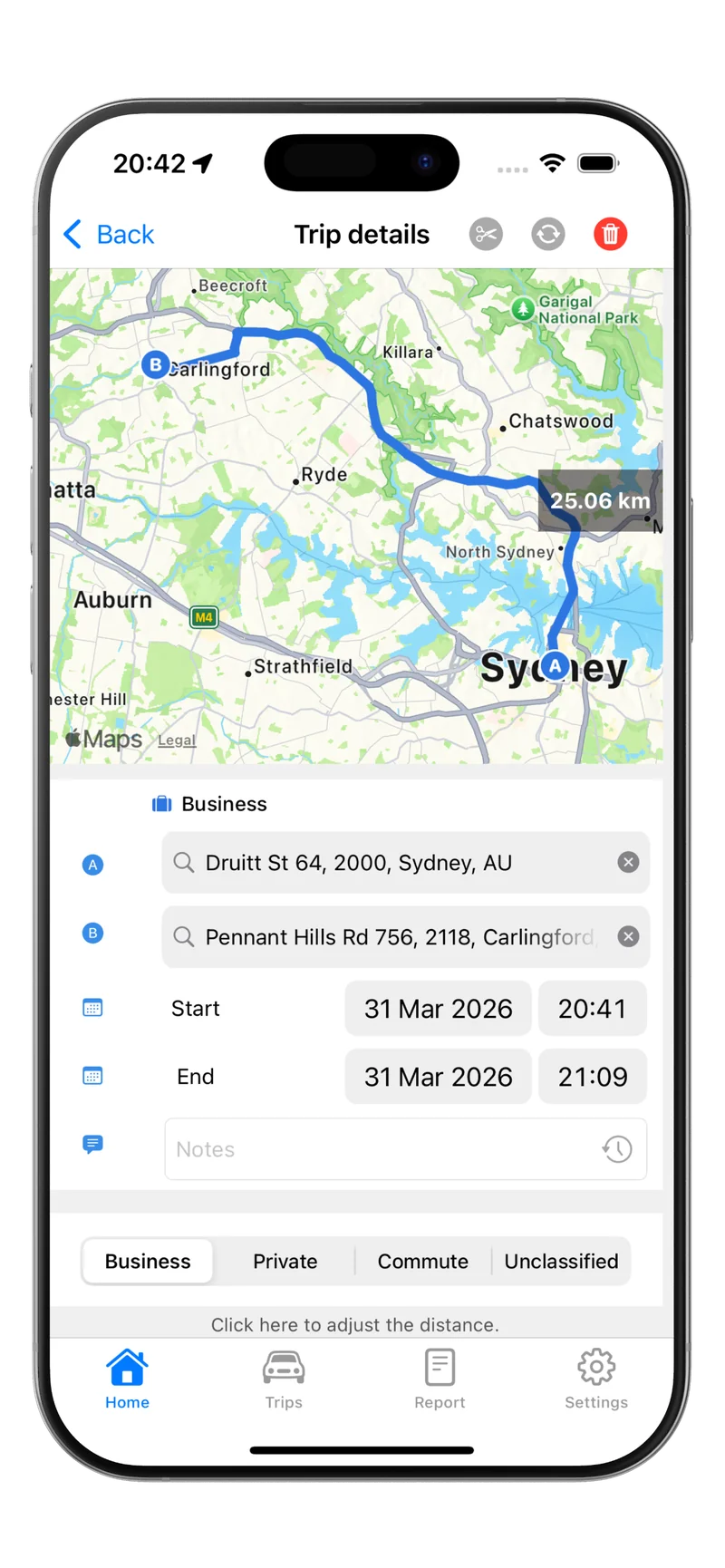
The result is a trip record that includes the date, start address, end address, distance in kilometres, and the time. You then open the app and add the final piece: the work purpose.
GPS vs motion detection: what’s the difference?
Some apps rely on GPS alone, which means continuous location tracking. This can drain the battery and feel invasive. Better apps combine the motion coprocessor with GPS selectively — the motion chip detects that a drive may have started, then GPS is activated to record the route. Once the trip ends, GPS turns off.
The practical upside is that battery impact is minimal. The accuracy for distance and routing is the same either way, because both approaches use GPS for the actual trip recording.
Motion detection starts and stops tracking intelligently, reducing unnecessary battery use. GPS-only approaches are simpler but less efficient. For day-to-day use, the combined approach is more reliable.
Does automatic tracking meet ATO requirements?
Yes — as long as the records are accurate and include what the ATO expects.
The ATO does not prescribe how you record your trips. It requires that records are contemporaneous (made at the time of travel) and that they include date, start and end locations, distance, and purpose. Automatically generated GPS records satisfy all of those requirements except one: purpose. You still need to add that yourself.
This is why classification matters. An automatically captured trip with no purpose label is incomplete. Once you add a brief note — “site visit – Parramatta” or “picked up equipment – Bunnings Greenacre” — the record is complete and ATO-compliant.
For a full breakdown of what the ATO requires under each method, see ATO logbook requirements.
Setting up automatic tracking on iPhone
Automatic tracking needs location permission set to “Always” in your iPhone settings. This allows the app to detect when you start driving even when it is not open on screen. Without this permission, the app cannot capture trips in the background.
Here is how to set it up in Tripbook:
- Download and open Tripbook.
- When prompted, allow location access and select “Always Allow”.
- If you missed the prompt, go to Settings → Privacy & Security → Location Services → Tripbook and set to “Always”.
- Enable motion and fitness access if prompted — this improves detection accuracy.
Once location access is set, drive as normal. Tripbook will begin detecting and logging your trips automatically.
Reviewing and classifying trips
After each drive, your trip appears in Tripbook’s trip list. You will see the date, map route, distance, and start and end addresses. To complete the record:
- Tap the trip.
- Mark it as Business or Personal.
- If business, add a short description of the work purpose.
This takes around 10 seconds per trip. Some people review trips at the end of each day; others do a weekly review. Either works. The key is not to leave it too long — the longer you wait, the harder it is to remember why you made a trip.
If you have a recurring route (for example, a regular client site), you can save it as a favourite to classify similar future trips in one tap.
Exporting your records
When you are ready to claim your deduction or prepare your tax return, Tripbook lets you export your trip log as a PDF or CSV. The report includes every field the ATO expects: date, start address, end address, distance, and purpose.
You can filter by date range before exporting. For the cents per kilometre method, Tripbook totals your business kilometres automatically. For the logbook method, it calculates your business-use percentage. For more on how these methods compare, see ATO car expense guide.
Keep your exported report with your other tax records. The ATO can request supporting documents for up to five years after lodgement.
Automatic kilometre tracking is the simplest way to stay on top of your work-related car expenses throughout the year — not just at tax time.
Download Tripbook and let your iPhone handle the logging.