GPS mileage tracking gives you the most reliable way to build an IRS-compliant mileage log. Instead of writing distances from memory at the end of the week, a GPS-based app records every trip in real time with timestamps, routes, and exact distances. The IRS does not mandate a specific tracking method, but it does demand accurate, contemporaneous records under Internal Revenue Code Section 274(d). GPS tracking satisfies that standard more convincingly than any manual approach, and in 2026 it can save you real money at the federal rate of 72.5 cents per mile.
This guide explains exactly what the IRS requires from your mileage records, why GPS data strengthens your position, and how to make sure your tracking setup is fully compliant.
What the IRS Requires in a Mileage Log
Under IRC Section 274(d) and IRS Publication 463, every business trip you deduct must be documented with five specific elements:
- Date of the trip
- Destination or location visited
- Miles driven for the trip
- Business purpose of the drive
- Odometer readings at the start and end of each tax year
Missing even one element on a trip entry can give the IRS grounds to deny that deduction. During an audit, incomplete records often lead to the entire mileage claim being thrown out because the Cohan rule, which allows reasonable estimates for some expenses, does not apply to vehicle deductions under Section 274(d).
The IRS also insists on contemporaneous record-keeping. That means your log should be created at or near the time of each trip, not reconstructed months later from memory. IRS regulations state that a log maintained on a weekly basis qualifies as contemporaneous, but daily entries are stronger.

Why GPS Mileage Tracking Meets IRS Standards
The IRS does not require you to use GPS. Paper logs, spreadsheets, and handwritten notebooks are all technically acceptable. However, IRS Regulation 1.274-5T(c)(2)(C)(2) explicitly states that a record prepared in a computer memory device with the aid of a logging program constitutes an adequate record. GPS-based mileage apps fall squarely into that category.
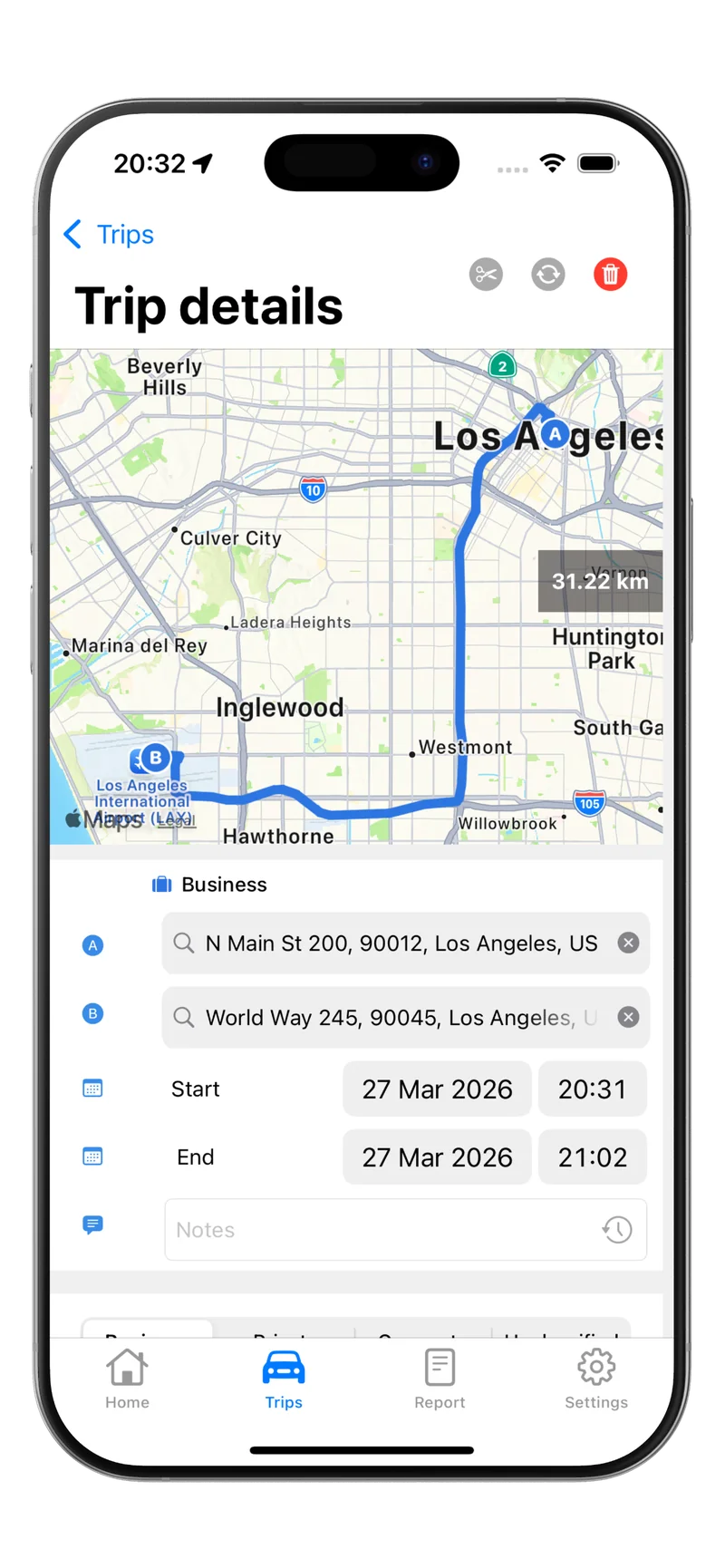
Here is what GPS tracking captures automatically:
- Exact distance calculated from real GPS coordinates along your actual route
- Start and end locations recorded as addresses, not guesses
- Date and time stamps generated by your device at the moment of travel
- Route data that proves the trip actually happened
This automated capture eliminates the most common audit problems: rounded distances, forgotten trips, and entries that look like they were filled in all at once. When an IRS examiner sees a GPS-generated log with consistent timestamps and location data, the credibility of your records goes up significantly compared to a handwritten notebook.
For a deeper look at every requirement, see our full guide on IRS mileage log requirements.
GPS Tracking vs. Paper Logs and Spreadsheets
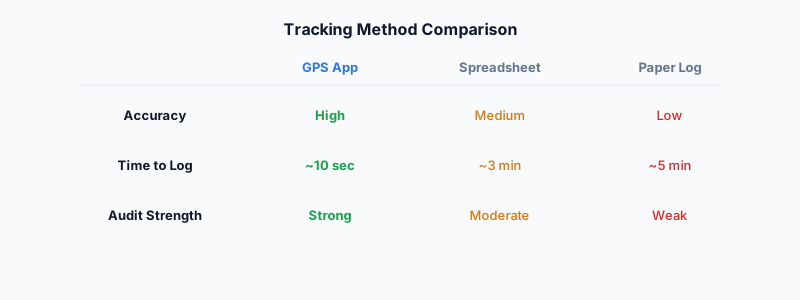
The core difference is reliability. A paper log depends entirely on you remembering to write down every trip, estimating the distance accurately, and doing it soon enough to count as contemporaneous. Spreadsheets are a step up because they are searchable and organized, but you still have to enter data manually.
GPS tracking removes human error from the distance calculation entirely. Your phone records the route, calculates the miles, and stores the entry with a timestamp. You still need to add a business purpose to each trip, but everything else is handled for you.
If you are still deciding between methods, our comparison of a mileage tracking app versus a paper log breaks down the pros and cons in detail.
How to Make Your GPS Tracking Fully IRS-Compliant
GPS handles distance, dates, and locations automatically. But the IRS still requires two things that no GPS can capture on its own: the business purpose of each trip and your annual odometer readings. Here is a step-by-step approach to closing those gaps.
Add a business purpose to every trip
After each drive, label the trip with a clear reason. Keep it specific. Instead of writing “work,” write “client meeting with ABC Corp” or “supply pickup at Home Depot for project.” The IRS wants enough detail to verify that the trip was genuinely business-related.
Record odometer readings twice a year
Note your vehicle’s odometer on January 1 and December 31 of each tax year. If you start using a vehicle for business mid-year, record the reading on that date as well. These readings help the IRS verify that your total logged miles are reasonable compared to actual vehicle usage.
Separate business and personal miles
If you use the same vehicle for both business and personal driving, your log must clearly distinguish between the two. GPS apps that let you classify trips as business or personal make this easy. The IRS calculates your deduction based only on the business percentage, so accurate classification matters.
Keep records for at least three years
IRS rules require you to retain mileage logs for a minimum of three years from the date you file the return claiming the deduction. If you report a loss on your return, extend that to seven years. Digital GPS logs stored in the cloud make long-term retention painless.
Back up your data
Electronic records must be as reliable as paper records. Store your logs in at least two places, such as the app’s cloud sync and an exported PDF or CSV file saved to your own storage. If your phone dies or you switch apps, you need your historical data intact.
What Happens if Your Log Is Not Compliant
Without adequate records, the IRS can disallow your entire mileage deduction. In Tax Court cases involving vehicle expenses, judges consistently rule against taxpayers who lack contemporaneous documentation. Reconstructed logs, where you try to recreate a mileage history after the fact, are allowed but carry significantly more risk than records made at the time of travel.
The financial impact adds up quickly. If you drive 15,000 business miles per year, the 2026 deduction at 72.5 cents per mile is worth $10,875. Losing that deduction because your log was incomplete means paying tax on that full amount, which could cost you $2,000 to $3,500 or more depending on your bracket.
Setting Up GPS Mileage Tracking the Right Way
Getting started takes less than five minutes. Install a GPS-based mileage tracking app, enable location permissions, and let it run in the background. The best apps detect when you start and stop driving automatically, so you do not have to remember to press a button.
After each trip, review the entry and add a business purpose. At the end of each week, do a quick check to make sure all trips are classified correctly. This weekly habit takes two to three minutes and keeps you on the right side of the IRS contemporaneous recording standard.
For a walkthrough of how automatic trip detection works and what to look for in an app, read our guide on automatic mileage trackers.
Start Tracking Every Business Mile Today
GPS mileage tracking is the simplest path to a mileage log the IRS will accept without question. It captures the hardest fields automatically, timestamps every entry, and builds a digital paper trail that holds up under scrutiny. Pair it with the habit of labeling your business purpose after each trip, and you have a system that meets every requirement of Section 274(d).
The 2026 standard mileage rate of 72.5 cents per mile means every unclaimed trip is money lost. Do not wait until tax season to scramble for records.
Download Tripbook and let GPS do the work for you.