A mileage tracking spreadsheet is one of the most popular ways for self-employed professionals and business owners to record their driving. It costs nothing, works in Excel or Google Sheets, and — when set up correctly — satisfies every IRS documentation rule. The challenge is that most spreadsheets people actually use are missing required fields, lack built-in error checks, and silently let deductions slip away.
In this guide, you will learn exactly which columns your mileage tracking spreadsheet needs, how to add formulas that calculate your deduction automatically, and where spreadsheets fall short compared to dedicated tracking apps.
What the IRS requires in a mileage tracking spreadsheet
The IRS does not prescribe a specific format. Paper notebooks, PDFs, spreadsheets, and apps are all accepted as long as each trip entry contains the required information. For full details, see our IRS mileage log requirements guide.
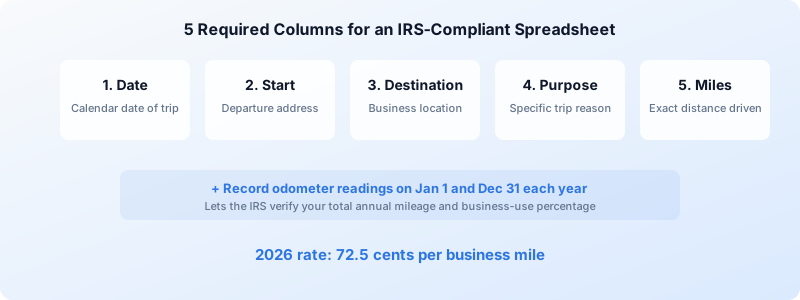
Every row in your spreadsheet must capture these five data points:
- Date — The specific calendar date the trip occurred.
- Starting location — A street address or recognizable place name.
- Destination — Where you drove to, again with enough detail to verify.
- Business purpose — A brief but specific explanation such as “Delivered proposal to Acme Corp” rather than just “business.”
- Miles driven — The distance for that single trip.
You also need to record your odometer reading at the start and end of each calendar year and track your total annual mileage split between business and personal use. Those year-boundary readings let the IRS confirm that your per-trip totals add up to realistic annual figures.
The IRS expects records created at or near the time of travel. A spreadsheet filled out once a month from memory is far more likely to be rejected in an audit than one updated the same day or within the same week.
Setting up your mileage tracking spreadsheet
Whether you use Excel or Google Sheets, the structure is the same. Create a workbook with one tab per month (or one tab for the entire year if you prefer scrolling). Each tab needs the following columns:
| Column | Contents | Example |
|---|---|---|
| A | Date | 07/20/2025 |
| B | Starting location | 123 Main St, Austin, TX |
| C | Destination | 456 Oak Ave, Round Rock, TX |
| D | Business purpose | Client site visit — Q3 contract review |
| E | Odometer start | 45,210 |
| F | Odometer end | 45,238 |
| G | Miles driven | =F2-E2 |
| H | Rate | 0.725 |
| I | Deduction | =G2*H2 |
Key formulas to include
The simplest formula you need is the mileage calculation in column G: subtract the starting odometer from the ending odometer. Then multiply by the IRS standard rate in column I to get the deduction amount per trip.
At the bottom of each monthly tab, add summary rows:
- Total business miles:
=SUM(G2:G100) - Total deduction:
=SUM(I2:I100) - Average trip distance:
=AVERAGE(G2:G100)
For a full year summary tab, use SUMIF to pull totals from each month so you can see cumulative figures at a glance.
Optional columns that help during audits
While the IRS only mandates the five core fields, adding a few extra columns can save you during an audit:
- Client or project name — ties the trip to a specific business relationship.
- Vehicle used — essential if you drive more than one car for business.
- Round trip indicator — flags whether you returned to your starting point.
- Notes — space for context like weather detours, toll roads, or parking.
For a ready-made version with all of these columns, see our mileage log template which includes downloadable Excel and PDF formats pre-loaded with the 2026 IRS rate.
Common mileage tracking spreadsheet mistakes
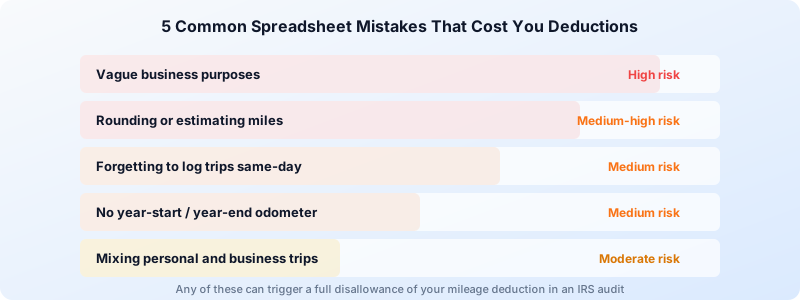
Even well-intentioned spreadsheets can create problems at tax time. Here are the errors we see most often:
1. Vague business purposes
Writing “business” or “meeting” in the purpose column is not specific enough. The IRS wants to see who you met, what company they work for, and why the trip was necessary. A detailed entry takes ten extra seconds but can protect thousands of dollars in deductions.
2. Rounding or estimating miles
Entering “about 30 miles” instead of using odometer readings or a mapping tool undermines your entire log. If one entry looks estimated, an auditor may question every entry. Use your odometer or a GPS-based tool to get exact figures.
3. Forgetting to record trips same-day
The biggest weakness of any spreadsheet is that it relies entirely on you remembering to open it. Unlike an app that tracks automatically, a spreadsheet sits idle until you type something. Skipping even a few days creates gaps that compound quickly.
4. No year-start and year-end odometer readings
Many spreadsheet users track individual trips perfectly but forget to note their odometer on January 1 and December 31. Without those bookend readings, the IRS cannot verify your total annual mileage or your business-use percentage.
5. Mixing personal and business trips
Every trip in your log should be clearly categorized. If you run a personal errand on the way to a client meeting, only the business portion is deductible. A clean spreadsheet separates these or includes a column that flags trip type.
Mileage tracking spreadsheet vs. a dedicated app
A spreadsheet works — but it demands discipline. Here is an honest comparison:
| Factor | Spreadsheet | Tracking app |
|---|---|---|
| Cost | Free | Free to low-cost |
| Automatic GPS tracking | No | Yes |
| Trip detection | Manual entry only | Automatic |
| IRS-compliant format | Only if set up correctly | Built in |
| Forgotten trips | Common | Rare |
| Export for tax filing | Manual formatting | One-click PDF/CSV |
| Odometer tracking | Manual | Automatic |
| Time per week | 15-30 minutes | Under 1 minute |
Spreadsheets are a solid starting point, especially if you only drive a handful of business trips per month. But once you are logging more than a few trips per week, manual entry becomes a real liability. Forgotten trips mean lost deductions, and at the 2026 rate of 72.5 cents per mile, even five missed trips of 20 miles each costs you $72.50 in write-offs per month.
For a deeper look at the tradeoffs, read our app vs. paper log comparison.
When to upgrade from a spreadsheet
Consider moving beyond a mileage tracking spreadsheet if any of these apply:
- You drive more than 10 business trips per week. The time cost of manual entry adds up, and the risk of forgotten trips increases.
- You have been audited or received an IRS notice. An app with GPS-verified trip data provides stronger substantiation than a self-reported spreadsheet.
- You manage multiple vehicles. Switching between tabs and remembering which car you drove adds friction and error potential.
- You need to share reports with an accountant or employer. Apps generate clean, formatted reports automatically.
Ready to stop typing and start tracking?
Tripbook automatically records every business trip with GPS accuracy, calculates your deduction at the current IRS rate, and exports audit-ready reports — no spreadsheet formulas required.
Download Tripbook FreeTips for maintaining your spreadsheet long-term
If you decide to stick with a spreadsheet for now, these habits will keep it IRS-ready:
- Set a daily reminder. A phone alarm at the end of each workday takes two minutes to act on and prevents week-long gaps.
- Use data validation. In Google Sheets or Excel, restrict the date column to valid dates and the miles column to positive numbers. This prevents typos from corrupting your totals.
- Back up regularly. A lost spreadsheet means lost deductions. Save to cloud storage and keep at least one offline copy.
- Lock completed months. Once a month ends, protect that sheet tab so you cannot accidentally edit historical entries. This also strengthens your case in an audit since it shows records were not altered after the fact.
- Update the mileage rate each January. The IRS adjusts the standard rate annually. For 2026, the rate is 72.5 cents per mile. Hardcoding last year’s rate is an easy mistake.
Conclusion
A well-structured mileage tracking spreadsheet gives you a free, flexible way to document your business driving and claim every deduction you have earned. The key is setting it up with all five IRS-required fields, using formulas to eliminate math errors, and — most importantly — filling it out consistently.
For many self-employed professionals, a spreadsheet is the right starting tool. When the volume of trips makes manual entry unreliable, switching to an automatic tracker like Tripbook ensures you never leave deductions on the table.