If you deliver with Uber Eats, mileage is almost certainly your largest tax write-off. Uber Eats mileage tracking through the app itself, however, captures only a fraction of the miles you can legally deduct. The gap between what Uber records and what the IRS allows can easily be worth hundreds or even thousands of dollars at tax time.
This guide breaks down exactly which miles qualify, where the Uber Eats app falls short, and how to keep a log the IRS will accept.
How Uber Eats drivers are taxed
Uber classifies delivery drivers as independent contractors, not employees. You receive a 1099-NEC (if you earned $2,000 or more from referral bonuses or promotions) and possibly a 1099-K for delivery earnings. All of this income goes on Schedule C, Profit or Loss from Business, when you file your federal return.
Because you are self-employed, you also owe self-employment tax (15.3% covering Social Security and Medicare) on your net profit. That makes deductions especially valuable: every dollar you deduct reduces both your income tax and your self-employment tax.
The OBBBA (One Big Beautiful Bill Act) made the TCJA individual tax provisions permanent, which means the standard mileage deduction for self-employed drivers is here to stay.
Which Uber Eats miles are deductible?
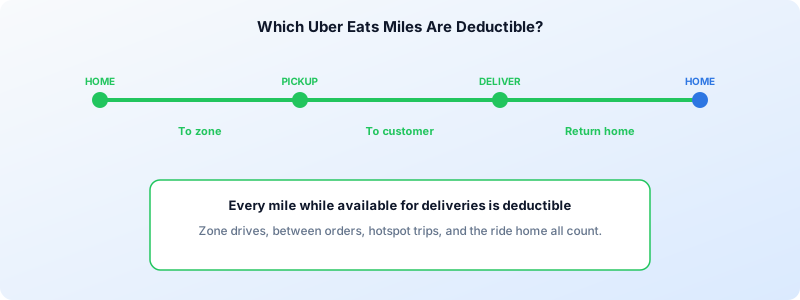
The IRS allows you to deduct any mile driven with a business purpose. For Uber Eats delivery drivers, that includes more trips than most people realize:
- Driving from home to your first pickup (if your home qualifies as your principal place of business)
- Traveling to a restaurant to pick up an order
- Delivering the order to the customer
- Driving between deliveries while waiting for the next request
- Heading to a busy area (hotspot) to increase your chances of getting an order
- Returning home after your last delivery
The general rule: if you are available for deliveries on the Uber Eats app and driving with a business intent, those miles count.
Home-to-zone driving: when does it count?
A common question is whether your drive from home to the area where you deliver counts as a deductible business mile or a non-deductible commute. The answer depends on whether your home is your principal place of business.
If you use a dedicated space at home to manage your delivery schedule, handle bookkeeping, and perform other administrative work, your home likely qualifies. In that case, your first trip of the day from home to your delivery zone is deductible, and so is your last trip back.
If your home does not qualify as your principal place of business, those first and last trips of the day are treated as personal commuting miles and cannot be deducted.
For more on the distinction between business and personal miles, see our guide on gig economy mileage tracking.
Why the Uber Eats app is not enough
Uber provides a mileage estimate in your annual tax summary. This figure has two major limitations:
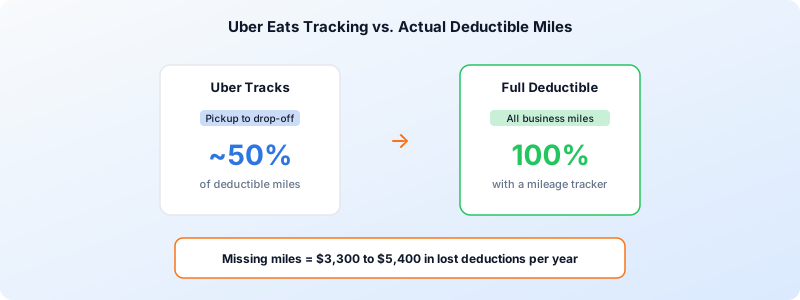
- It only counts “online” miles. Uber tracks the distance from pickup to drop-off for each delivery. It does not capture your drive to the restaurant, miles between deliveries, trips to hotspots, or your drive home.
- It is not an IRS-compliant log. The IRS requires a contemporaneous mileage record that includes the date, destination, business purpose, and odometer readings or GPS data for each trip. Uber’s summary provides none of this.
Drivers who rely solely on Uber’s numbers routinely undercount their deductible mileage by 30% to 50%. On 15,000 business miles per year at the 2026 IRS rate of 72.5 cents per mile, that gap translates to roughly $3,300 to $5,400 in missed deductions.
Standard mileage rate vs actual expenses
You have two options for claiming your vehicle deduction on Schedule C:
Standard mileage rate — Multiply your business miles by the IRS rate (72.5 cents per mile for 2026). This method is simpler and works well for most Uber Eats drivers because the per-mile rate already factors in gas, insurance, depreciation, and maintenance.
Actual expense method — Track every vehicle-related cost (fuel, insurance, tires, repairs, registration, depreciation) and multiply the total by your business-use percentage. This can produce a larger deduction if you drive an older or fuel-efficient vehicle, but requires significantly more recordkeeping.
You must choose one method for each vehicle each year. If you want to use the standard mileage rate, you must elect it in the first year the vehicle is available for business use; you can switch to actual expenses later. Going the other direction (actual to standard) is more restricted.
For a detailed walkthrough of Schedule C vehicle deductions, see our Schedule C mileage deduction guide.
What the IRS expects from your mileage log
The IRS does not prescribe a specific format, but it does require records that are kept at or near the time each trip occurs. Your log should include:
- Date of the trip
- Starting and ending locations (or odometer readings)
- Miles driven
- Business purpose (for example, “Uber Eats delivery — picked up at Main St Sushi, delivered to 42 Oak Ave”)
- Total miles on the vehicle for the year (business plus personal)
Paper logs work in theory but are difficult to maintain consistently during a busy delivery shift. That is why most drivers use a GPS-based mileage tracking app that records trips automatically in the background.
How to track Uber Eats miles automatically
The easiest way to build an IRS-compliant log is to use an app that runs in the background while you deliver. Here is a practical workflow:
- Start your mileage tracker before you leave home. Open the tracking app before you launch Uber Eats so the drive to your delivery zone is captured.
- Keep tracking between orders. Do not stop the tracker when you are waiting for the next ping. Those in-between miles are deductible as long as you remain available for deliveries.
- Stop tracking when you are done for the day. End the trip once you arrive home after your last delivery.
- Tag each trip as business. Most tracking apps let you classify trips so personal errands during a shift are excluded.
- Export your log at tax time. Generate a report with all the fields the IRS requires and hand it to your tax preparer or import it into your tax software.
If you also drive for other platforms like Grubhub, a single tracking app can capture all of your delivery miles in one place, making multi-platform tax filing far simpler.
Other deductions Uber Eats drivers should claim
Mileage is the biggest line item, but it is not the only one. Common Schedule C deductions for delivery drivers include:
- Phone bill — the business-use percentage of your monthly plan
- Phone accessories — car mounts, chargers, and cases used for deliveries
- Insulated bags — hot bags and cooler bags purchased for food delivery
- Tolls and parking — costs incurred during active deliveries
- Safety gear — phone holders, dash cams, and reflective vests
- Car washes — when done specifically for delivery work
Keep receipts or digital records for each of these expenses. They go on Schedule C alongside your mileage deduction.
How much can Uber Eats drivers save?
The math is straightforward. If you drive 18,000 business miles in 2026 and use the standard mileage rate:
18,000 miles x $0.725 = $13,050 deduction
At a combined federal and self-employment tax rate of roughly 30%, that deduction saves you about $3,915 in taxes. Drivers who fail to track all of their miles — especially the trips between deliveries and to hotspots — could be leaving a third or more of that on the table.
Start tracking every mile today
Uber Eats mileage tracking does not have to be complicated. An automated mileage app captures every deductible mile in the background while you focus on delivering. The key is to start now, not at tax time, so your log is complete and IRS-ready when you file.
Download Tripbook to automatically track your Uber Eats miles and build a tax-ready mileage log with zero manual effort.