You have two options for tracking your business miles: a mileage tracking app or a paper log. Both can satisfy IRS requirements, but the difference in accuracy, time spent, and deductions claimed is significant. With the 2026 standard mileage rate at 72.5 cents per mile, every forgotten trip costs you real money.
This guide breaks down the mileage tracking app vs paper log debate so you can pick the method that protects your deductions and saves you time.
The Case for Paper Mileage Logs
Paper logs have been around for decades, and they still work for some drivers. You grab a notebook, write down the date, starting odometer, ending odometer, destination, and business purpose. Done.
The appeal is simplicity. There are no subscriptions, no GPS permissions, and no learning curve. A $5 notebook from an office supply store gives you a full year of tracking. You can find a free mileage log template to print and keep in your glove compartment.
For drivers who make only a few business trips per month, a paper log can be a reasonable starting point. You control every entry, and you never have to worry about battery drain or app updates.
The Problems with Paper Tracking
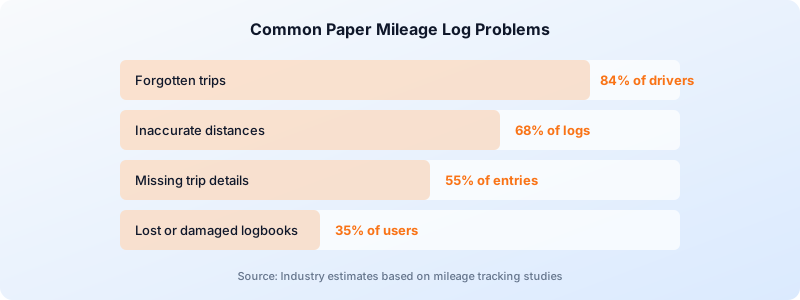
Paper mileage logs break down quickly when real life gets in the way. The biggest paper mileage log problems fall into four categories: forgotten trips, inaccurate distances, missing details, and lost records.
Forgotten trips are the most expensive problem. Research from mileage tracking companies suggests that drivers who track manually miss 20-40% of their deductible trips. At 72.5 cents per mile, forgetting just 10 miles a week costs you $377 per year in lost deductions.
Distance estimates are unreliable. When you write down mileage after the fact, you round up or down. Over hundreds of trips, those rounding errors compound. The IRS expects accurate odometer readings, not guesses.
Missing details trigger audit problems. The IRS requires the date, destination, business purpose, and mileage for every trip. Paper logs often have entries like “client meeting — 23 miles” with no address or purpose. That kind of entry may not survive an audit. Review the full list of IRS mileage log requirements to see what your records need to include.
Paper gets lost or damaged. A coffee spill, a car cleaning, or a move between vehicles can destroy months of records. There is no backup for a paper log sitting in your center console.
How Mileage Tracking Apps Work
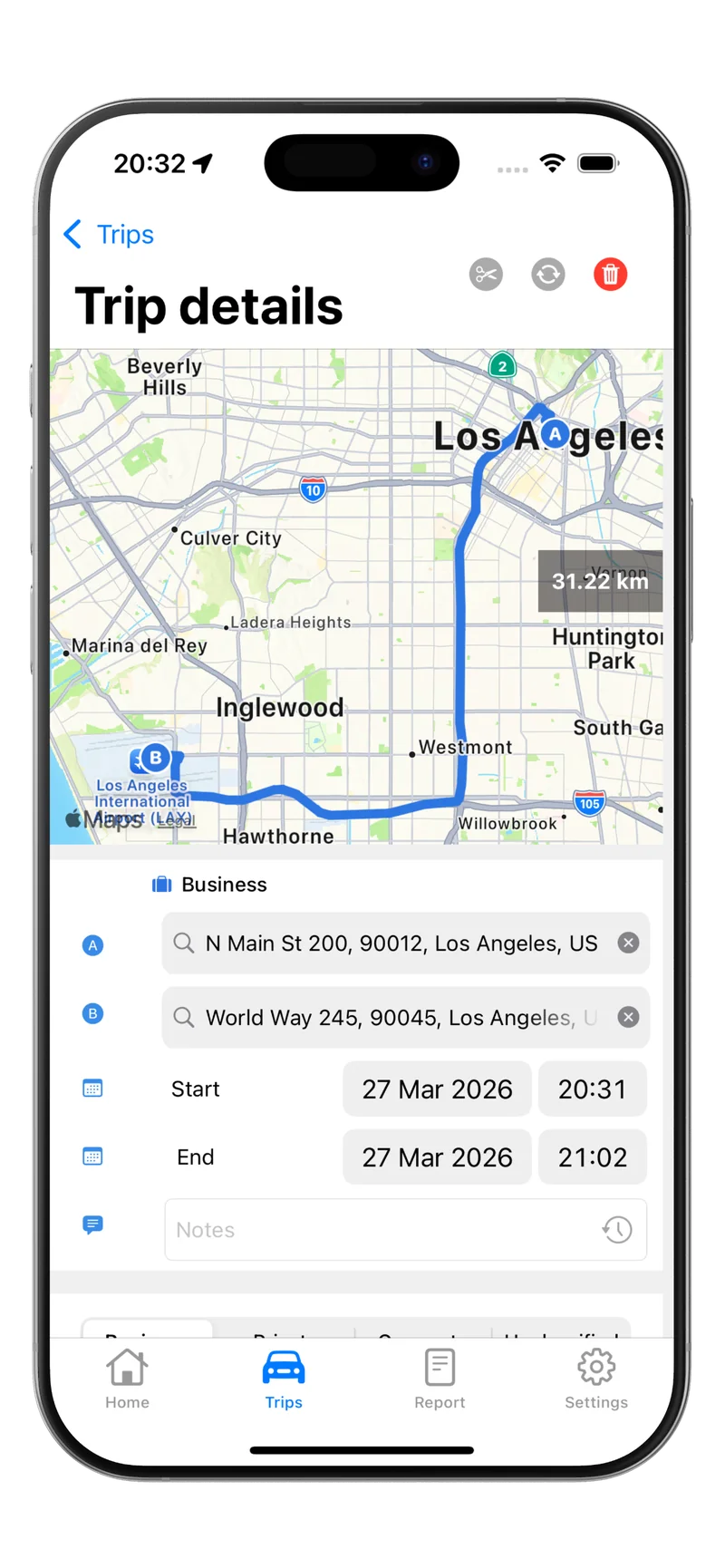
A mileage tracking app replaces manual entry with automatic mileage tracking vs manual logging. Most apps use GPS and motion sensors in your phone to detect when you start driving and record the trip in the background.
Here is what happens with an app like Tripbook:
- Automatic detection. The app senses vehicle motion and begins recording your route via GPS. You do not press any buttons.
- Accurate distance. GPS tracks your exact path, so the mileage is precise to the tenth of a mile, not a rough estimate.
- Trip classification. After each trip, you swipe to classify it as business, personal, or commute. Tripbook makes this a one-second swipe.
- Complete records. The app logs the date, start and end addresses, distance, and driving time automatically. You just add the business purpose.
- Export-ready reports. Generate IRS-compliant PDF, XLS, or CSV reports and send them to your accountant or employer in seconds.
The entire process takes about two seconds of your attention per trip, compared to two minutes or more for a manual paper entry.
Quick math: If you drive 15 business trips per week, a paper log costs you roughly 30 minutes of logging time. An automatic app reduces that to about 30 seconds of swipe-to-classify time. That is over 24 hours saved per year.
App vs Paper: Side-by-Side Comparison
The digital vs paper mileage log decision comes down to five factors. Here is how they stack up:
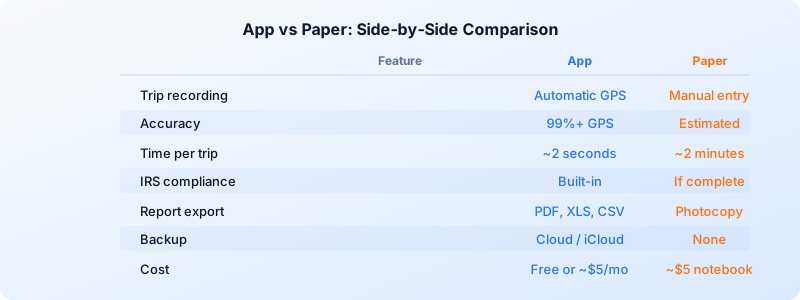
Accuracy. GPS tracking delivers 99%+ distance accuracy. Paper logs rely on odometer readings you may forget to check or round incorrectly.
Time investment. Automatic tracking takes seconds per trip. Paper logging takes one to two minutes per entry, plus time to calculate totals and prepare reports.
IRS compliance. Apps automatically capture the date, distance, and addresses the IRS requires. Paper logs only meet requirements if you diligently fill in every field for every trip.
Data safety. A digital mileage tracker backs up your records to the cloud or iCloud. Paper records have zero redundancy. One lost notebook means starting over.
Cost. A paper notebook costs under $5. Mileage apps range from free to about $5 per month. But consider the return: if an app captures even 10 extra trips per month that you would have forgotten on paper, the deduction savings far exceed the subscription cost.
For a deeper look at how automatic tracking works, check out our guide on mileage tracking.
How to Switch from Paper to an App
Switching from a paper log to an automatic mileage tracking app takes about five minutes. Here is a simple transition plan:
Step 1: Download a tracking app. Install Tripbook or another GPS-based tracker on your iPhone. Tripbook is free for up to 20 trips per month, so you can test it without committing.
Step 2: Grant location permissions. The app needs “Always Allow” location access to detect trips automatically. This is what makes the tracking hands-free.
Step 3: Drive normally for one week. Let the app run in the background and record your trips. At the end of the week, compare the app’s recorded trips against what you would have written down. Most drivers find the app captured trips they would have forgotten.
Step 4: Classify your trips. Open the app each evening and swipe each trip as business or personal. This takes under a minute, even with 10+ trips.
Step 5: Keep your old paper log as backup. Hold onto your existing paper records for the current tax year. Once you have a full month of app-based tracking and trust the system, you can retire the notebook.
Tip: Do not delete or throw away paper logs from previous tax years. The IRS can audit returns up to three years back, so store old records safely even after you switch to an app.
The Bottom Line
The mileage tracking app vs paper log question has a clear answer for most drivers. Paper logs cost you time, accuracy, and deductions. An automatic tracking app captures every trip, records precise distances via GPS, and generates IRS-compliant reports you can export in seconds.
At 72.5 cents per mile, even a handful of missed trips per month adds up to hundreds of dollars in lost deductions each year. An app eliminates that risk.
Download Tripbook and start tracking your business miles automatically. It is free to try with up to 20 trips per month, requires no account to get started, and keeps your data private on your device.